
Overview
The Rapid7 integration connects autobotAI to the Rapid7 Insight Platform and your local InsightVM Security Console, enabling automation of vulnerability management, asset discovery, and risk assessment workflows. Using the Insight Platform Cloud API (v4) and the local Security Console API (v3), autobotAI can query assets, scan engines, sites, and vulnerabilities to assess security postures and trigger remediation playbooks.
This guide walks through configuring the Rapid7 integration in your autobotAI account.
Prerequisites
Before starting, ensure you have:
- An active Rapid7 Insight Platform account (for v4 API access).
- An API Key generated from the Insight Platform Administration page.
- Knowledge of your Rapid7 Insight Platform Region (e.g.,
us,eu,ap, etc.). - (Optional) Your on-premise Security Console URL and credentials if you plan to use local v3 API actions.
Steps to Set Up Rapid7 Integration
Step 1:
Navigate to the Integrations page by selecting Integrations from the menu. Click the + Add Integration button in the top-right corner.
Step 2:
Under Security Tools, locate the Rapid7 card and select + Add to begin configuring.
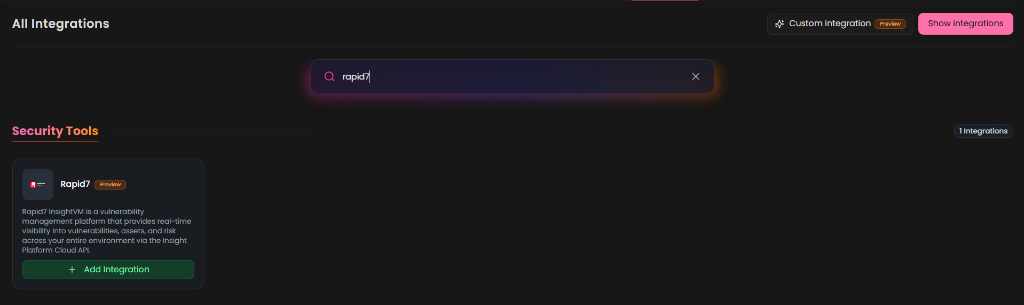
Step 3:
Fill in the required integration details:
- Alias*: Provide a clear name or identifier for this integration instance (e.g.,
Rapid7-Prod). - Tag(Optional): Choose a tag to help organize the integration.
- API Key*: Enter your Rapid7 Insight Platform API Key.
- Region*: Select your Insight Platform region from the dropdown list (e.g.,
United States (us),Europe (eu),Asia Pacific (ap), etc.). - Security Console URL (Optional - for v3 API): The URL to your on-premise Security Console (e.g.,
https://your-console.example.com:3780). - Security Console Username (Optional - for v3 API): The username for your Security Console.
- Security Console Password (Optional - for v3 API): The password for your Security Console.
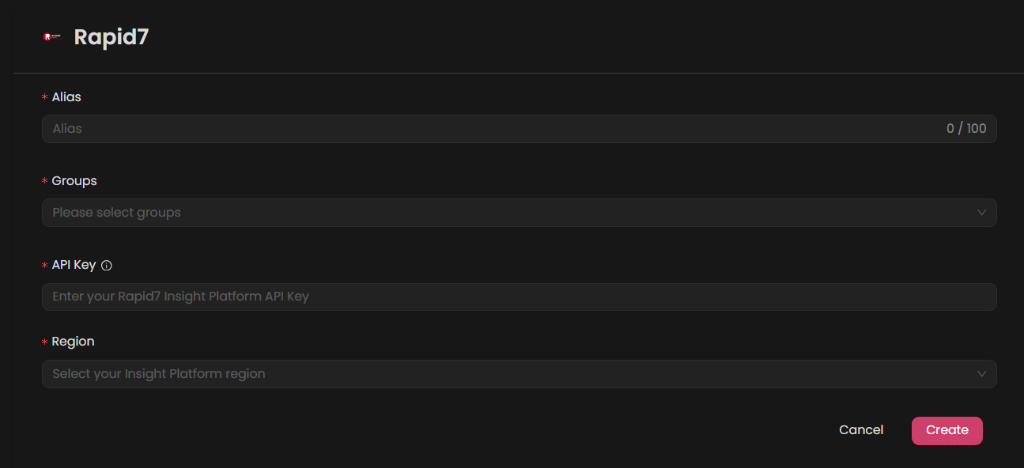
Verify the information and click Create to complete.
Step 4:
Once created, locate the integration under your active list. Click the play button next to it to test the integration, and ensure the status returns a successful validation. The test performs a validate call to check connectivity and key validity.
Additional Information
How to Retrieve Your Rapid7 API Key
To get your Insight Platform API Key:
- Log in to the Rapid7 Insight Platform:
Go to the Rapid7 Insight Platform and sign in with your administrator account. - Access API Settings:
Navigate to the Administration menu, then select API Key Management. - Generate the API Key:
Click Generate Key, copy it, and store it securely.
Copy this key and paste it into the API Key field in autobotAI.
How to Identify Your Region
Your region is indicated in the URL when you are logged into the Insight Platform (for example, https://us.insight.rapid7.com corresponds to the us region). Select the matching region in the dropdown menu when configuring the integration in autobotAI.
Configuring for Local Security Console (v3 API)
If you plan to use autobotAI with the on-premise Security Console API (v3) to trigger scans or pull asset and vulnerability data directly from your local instance:
- Ensure your autobotAI agent has network access to reach your Security Console (e.g.,
https://<console-ip>:3780). - Provide the Security Console URL, Username, and Password in the integration setup.
- Note that the API Key is still required for the overall integration configuration but is used exclusively for the Cloud Platform API (v4).