
autobotAI runs in one place and works wherever your systems are. The platform runs as SaaS or as a self-hosted workspace in your AWS account, and its agents reach every cloud, SaaS tool and data center from there, over paths your network team controls.
Four ways autobotAI reaches a system
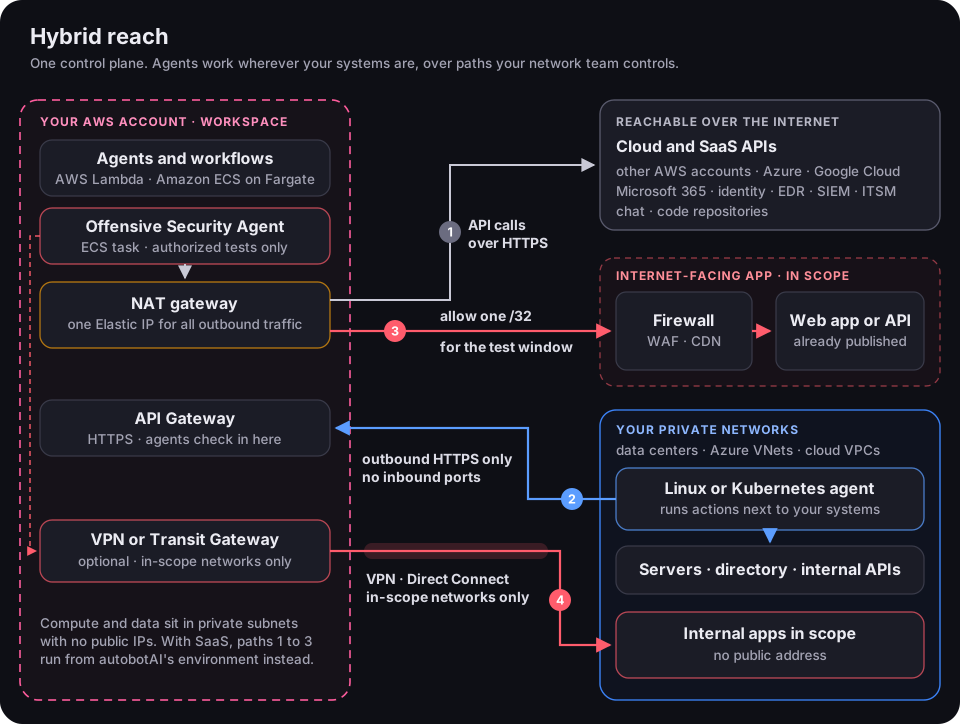
- Use it for
- Cloud APIs (AWS, Azure, Google Cloud) and SaaS tools: identity, EDR, SIEM, ITSM, chat and code
- You set up
- Nothing, unless a tool accepts API calls only from known addresses. Then allow-list the Elastic IP
- Use it for
- Defensive work on private systems: commands, scripts, Ansible, SSH, kubectl, CLI tools and internal APIs
- You set up
- Outbound HTTPS from the agent host. No inbound ports
- Use it for
- Penetration tests of internet-facing apps and APIs, and the WAF in front of them
- You set up
- One temporary inbound rule, for the test window
- Use it for
- Penetration tests of internal apps that have no public address
- You set up
- The connection, routes for the in-scope networks only, and one internal firewall rule
What each deployment can reach
| Path | SaaS | Self-hosted workspace |
|---|---|---|
| 1. API calls to cloud and SaaS tools | Yes | Yes, from your workspace's Elastic IP |
| 2. Private systems through a Linux or Kubernetes agent | Yes | Yes |
| 3. Penetration tests of published apps | Yes, ask support for the addresses to allow-list | Yes, from your workspace's Elastic IP |
| 4. Penetration tests of internal apps | No, choose a self-hosted workspace | Yes |
Multi-cloud and on-premises at a glance
- API
- A cross-account IAM role per account, or your AWS Organization
- Private
- An agent in the VPC, or VPC peering or a transit gateway to the workspace VPC
- API
- An app registration with a client secret
- Private
- A Linux agent in the VNet, the Kubernetes agent in AKS, or a VPN to an Azure VPN gateway
- API
- A service account key
- Private
- A Linux agent in the VPC, the Kubernetes agent in GKE, or a VPN to Cloud VPN
- API
- Called directly, if the tool's API is reachable from the internet
- Private
- A Linux or Kubernetes agent on site, or a VPN or Direct Connect
- API
- Native integrations over HTTPS
- Private
- Not needed
The workspace itself runs in AWS. Azure, Google Cloud and your data centers need no autobotAI deployment of their own: credentials for their APIs, and an agent or a network connection for anything private.
Blue team: acting inside private networks
Defensive work, such as isolating a host, disabling an account in your on-premises directory, patching a server or collecting evidence, needs an agent next to the systems, not an open port.
How the agent works
- 1Install it insideAdd a Linux or Kubernetes integration and install the agent in the network.
- 2It connects outThe agent registers with the autobotAI API over HTTPS. Nothing connects in.
- 3It runs the stepWhen a workflow step uses that integration, the agent runs it next to your systems.
- 4Results come backOutput, approvals and the audit trail are kept in autobotAI, the same as for cloud actions.
What the agent runs
| You need to | Use |
|---|---|
| Run cloud CLIs and infrastructure code from inside the network | AWS CLI, Azure CLI, Google Cloud CLI, Terraform |
| Run scripts and configure servers | Bash script, Ansible playbook, Local Ansible playbook |
| Run a command on hosts the agent can reach | Command over SSH |
| Act in a Kubernetes cluster | kubectl command, Kubernetes manifest |
| Call an internal API | Python HTTP request through the agent |
Credentials for CLI tools can stay on the agent host, in its configuration profiles, inside your network.
Where to put the agent
Host and network requirements
If the host reaches the internet through an egress firewall or proxy, allow:
| Destination | Why | When |
|---|---|---|
| The Agent API URL shown when you add the agent | Registering, picking up work, returning results | Always |
autobotai-linux-agent.s3.amazonaws.com and autobotai-linux-agent.s3.us-east-1.amazonaws.com | Installer, agent binary and updates | Install and updates |
www.google.com | Internet check by the installer and at start-up | Install and start-up |
| The systems the agent acts on | The ports each action needs, such as SSH (22) | As your workflows need |
The Kubernetes agent needs outbound HTTPS (443) and DNS (53) from its pod, and nothing inbound. Its optional network policy enforces exactly that. See Kubernetes agent.
Red team: reaching applications for penetration tests
The Offensive Security Agent needs real network reach to each target, because every probe and request has to arrive at the application. In a self-hosted workspace it runs as an ECS task in the workspace's private subnets; on SaaS it runs in autobotAI's environment. Linux and Kubernetes agents run integration actions; they don't carry scan traffic.
Choose the path
Mixed targets are normal: a public front end through path 3 and its internal services through path 4, in the same test.
- Route
- Agent, NAT gateway, internet, your perimeter, the app
- Source address
- The workspace's Elastic IP, static while the stack exists
- You configure
- One inbound rule: that address as a /32 to the app, on the ports in scope
- You expose
- Nothing new. The app is already published; you let one more address through, for the window
- Best for
- Customer portals, partner and API gateways, anything already published
- Route
- Agent, workspace route table, encrypted tunnel, your VPN device, the app
- Source address
- The workspace's private subnets
- You configure
- The VPN or Direct Connect, routes for the in-scope networks, one internal firewall rule
- You expose
- Nothing is published. With a site-to-site VPN, your device starts the tunnels
- Best for
- Internal web apps and APIs, admin consoles, back-office systems
Published apps: allow-list one address
Everything the workspace sends to the internet leaves through its NAT gateway, so the test arrives from one static address. Hop by hop:
- 1The agent opens the sessionfrom its private address in the workspaceAllowed by the workspace's security group
- 2The NAT gateway swaps the sourceto the workspace's Elastic IPWorkspace NAT gateway
- 3It crosses the internetTLS to the app's public addressNo change
- 4It reaches your perimeterthe one place a decision is madeYour allow-list rule: Elastic IP /32 to the app
- 5Through the WAF or CDNif one is in front of the appYour WAF decision: test through it, or allow past it
- 6It reaches the appand the test beginsYour existing app controls, as in production
Your steps for the window:
- 1Find the addressIn the AWS console, open VPC > NAT gateways in the workspace's region and note its Elastic IP. On SaaS, ask support.
- 2Add one inbound ruleSource that address as a /32, destination the in-scope app, on the ports in scope (usually 443), for the window only.
- 3Decide how the WAF treats the testLeave it on to see what an attacker sees, including what it blocks, or allow the address past it to test the app itself. The report should say which.
- 4Tell your SOC or MSSPShare the window and the source address, so the alerts are expected rather than escalated.
- 5Remove the rulewhen the window closes.
What usually gets in the way:
Internal apps: route only what is in scope
Connect your network to the workspace VPC and route only the networks in scope. Hop by hop:
- 1The agent opens the sessionto an internal address in scopeAllowed by the workspace's security group
- 2The route table sends it to the VPNonly in-scope networks have a routeWorkspace route table, in-scope networks only
- 3It crosses the encrypted tunnelIPsec over the internet, or Direct ConnectVirtual private gateway or transit gateway
- 4Your VPN device decrypts itinside your networkYour VPN configuration
- 5Your internal firewall checks itthe source is the workspace's private subnetsYour internal rule: workspace subnets to in-scope hosts and ports
- 6It reaches the appas an internal client wouldYour existing app controls, as in production
Ways to connect:
Your steps, before the window:
- 1Route only the in-scope networksin both directions, for the test window. A /32 per host gives the tightest scope.
- 2Allow the workspace's private subnetsas the source in your internal firewall, to the in-scope hosts and ports only.
- 3Resolve internal namesForward your internal domains to your DNS servers with a Route 53 Resolver outbound endpoint, or give targets by IP address.
- 4Avoid overlapping address rangesThe workspace VPC's range must not overlap the networks you route to it. Custom ranges are an Enterprise option chosen before you deploy; if ranges already overlap, NAT is needed on one side.
- 5Plan it with supportRoutes and attachments you add to the workspace VPC need to be kept through upgrades. Contact support.
These are the VPN settings we suggest. Your own standards apply where they are stricter.
Scope is enforced in three places
Internal networks you don't route have no path at all, and internet targets are limited to the domains you verified.
Before each test window
- In-scope targets: verified domains, repositories, and internal URLs or IP addressesApplication owner
- Written authorization and an agreed test windowSecurity lead
- The allow-list rule, or the VPN routes and internal ruleNetwork team
- The WAF decision: through it or past itApplication owner and security
- SOC or MSSP told the window and the source addressSecurity operations
- Test accounts, for authenticated testingApplication owner
- A workload to record findings, ideally with a resolver agent attachedautobotAI administrator
Run penetration tests only against systems you are authorized to test, inside the agreed window.
Findings land as tasks in Guardian. With a resolver attached, each one moves into the fix-and-verify loop: a drafted fix, a named approver, follow-up on the SLA and a re-test that proves it's closed.
Questions network and security reviewers ask
Do we have to open an inbound port?
Not for blue-team work: Linux and Kubernetes agents connect outbound only. To test a published app, you add one allow-list rule for the window. To test a private app over a site-to-site VPN, your device starts the tunnels.Can you test an internal app without a VPN?
No. A penetration test needs IP reach to the target, and Linux and Kubernetes agents don't carry scan traffic. Use private routing (path 4), or test only what is published.Once the VPN is up, how far can the agent go?
Only to the networks you route over it, and only to the hosts and ports your internal firewall allows from the workspace's private subnets. Route a /32 per host for the tightest scope.Our internal range overlaps the workspace VPC. What now?
Choose a range that doesn't overlap before you deploy; custom ranges are an Enterprise option. If an overlap can't be avoided, NAT is needed on one side.Will the test trip our IPS, WAF and SOC?
It can, and that is part of what it measures. Tell your SOC the window and the source address, decide whether the WAF is tested or bypassed, and agree thresholds for rate limits and lockouts.Is one Elastic IP really everything we need to allow?
For the internet, yes: everything the workspace sends there leaves from that address. Traffic to private networks over a VPN or Direct Connect comes from the workspace's private subnets instead.Does our data leave our network?
With a self-hosted workspace, credentials, findings, execution history and the audit trail stay in your AWS account. Prompts and context go to the model you choose; with Amazon Bedrock in your account, they stay there too. See Architecture and security.Plan it before you start
- Before choosing SaaS or self-hostedWill internal apps be tested?Testing internal apps needs a self-hosted workspace.
- Before you deployWhich networks will be routed to it?The workspace VPC's range must not overlap them.
- Before connecting toolsDo any accept calls only from known addresses?Allow-list the Elastic IP, or the SaaS addresses.
- Before the first private use caseWhich networks need defensive actions?Each isolated network needs its own agent.
Next steps
- Architecture and security: what runs where, and what stays in your account.
- Deploy a self-hosted workspace
- Linux agent and Kubernetes agent: install and configure.
- Offensive security scans: targets, verified domains and findings.
- Workspace reference: subnets, security groups and the NAT gateway.