
Security agents hold the keys to your most sensitive systems: they can disable accounts, change firewall rules and open pull requests. That is why most security teams run autobotAI as a self-hosted workspace: the agents, the credentials they use, the data they read and the record of everything they did stay in your own AWS account, under your own controls.
This page explains how a workspace is built, how each part is secured, exactly what leaves your account, and the guardrails you can add on top.
At a glance
| Self-hosted workspace | |
|---|---|
| Where it runs | A dedicated deployment in your AWS account and the region you choose. Nothing is shared with other customers. |
| What comes from autobotAI | Code only: the web app's static files your browser downloads, and the container images your workspace runs, pulled from autobotAI's private registry by your account alone. Neither contains customer data. |
| Where data is stored | Amazon DocumentDB in private subnets and Amazon DynamoDB, both in your account and encrypted at rest. |
| Where credentials live | AWS Secrets Manager in your account. Agents get authenticated clients, not raw secrets. |
| Who signs in | Your users, through Amazon Cognito in your account, with MFA and optional SSO. |
| Network exposure | Two HTTPS endpoints: API Gateway for API calls and an AppSync Events API for live updates. Compute and DocumentDB have no public IPs, and outbound traffic leaves through one NAT gateway. |
| Models | Amazon Bedrock in your account, or another provider you choose. |
| Audit | Execution history and audit trail in your account, plus your own CloudTrail and CloudWatch. |
Architecture
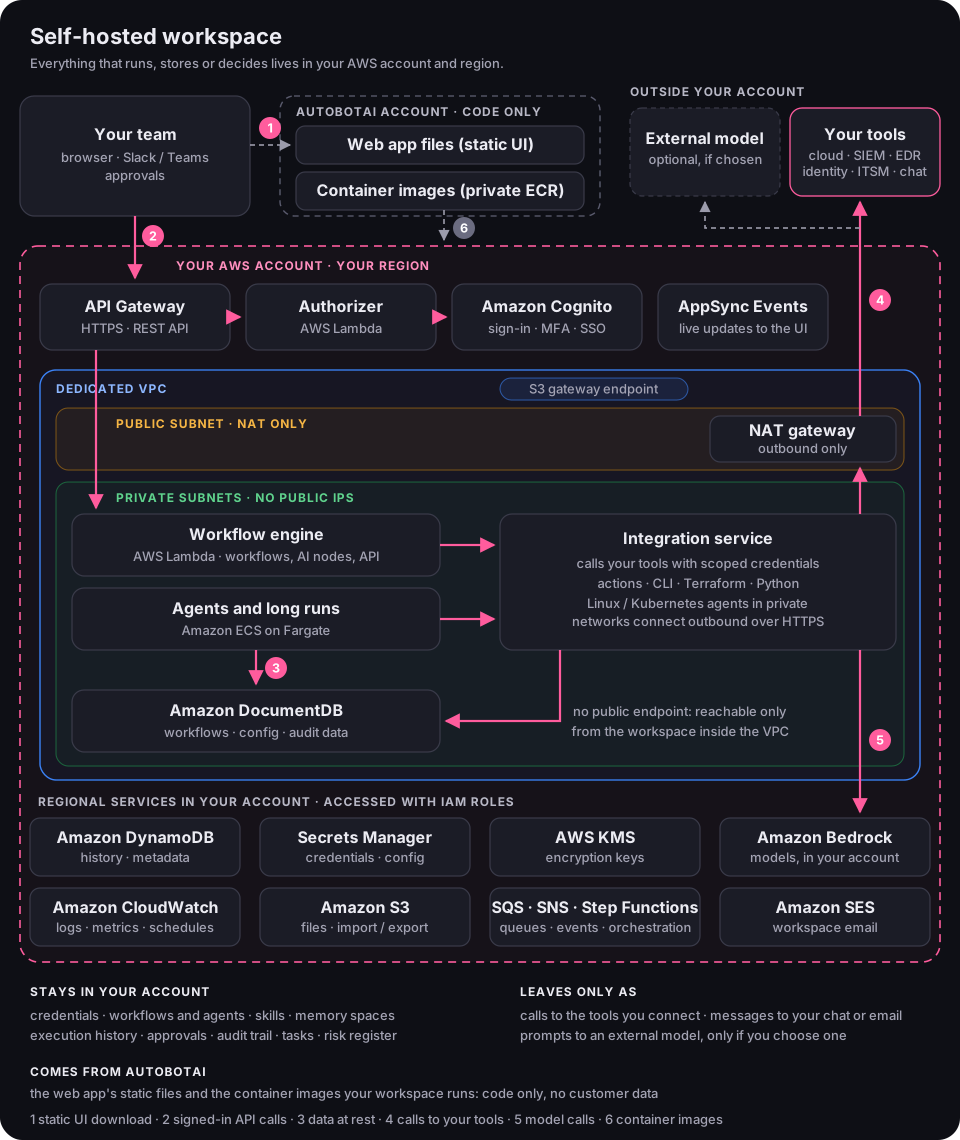
- Static UI download. Your browser loads the web app's static files from autobotAI. No customer data travels over this connection.
- Signed-in API calls. From then on, the browser talks to your account: API calls go to API Gateway, where an authorizer function checks each request against Amazon Cognito, and live updates such as run progress arrive through an AppSync Events API.
- Data at rest. Workflows, integration configuration, execution history and audit data are stored in Amazon DocumentDB, which runs in private subnets with no public endpoint, and in Amazon DynamoDB.
- Calls to your tools. The integration service calls the tools you connect (cloud, identity, SIEM, EDR, ITSM, chat) through the NAT gateway, using credentials held in Secrets Manager. Linux and Kubernetes agents installed in private networks connect outbound over HTTPS, so you don't open inbound ports.
- Model calls. AI nodes, agents and Optimus call the model you configure. With Amazon Bedrock, those calls stay inside your AWS account and region.
- Container images. Lambda functions and ECS tasks run container images that autobotAI publishes to its private Amazon ECR registry. Pull access is granted only to the AWS account you registered, in its region. Images bring code into your account; nothing is sent back through them.
Data flow, step by step
The diagram below is the workspace data flow as published to security reviewers.
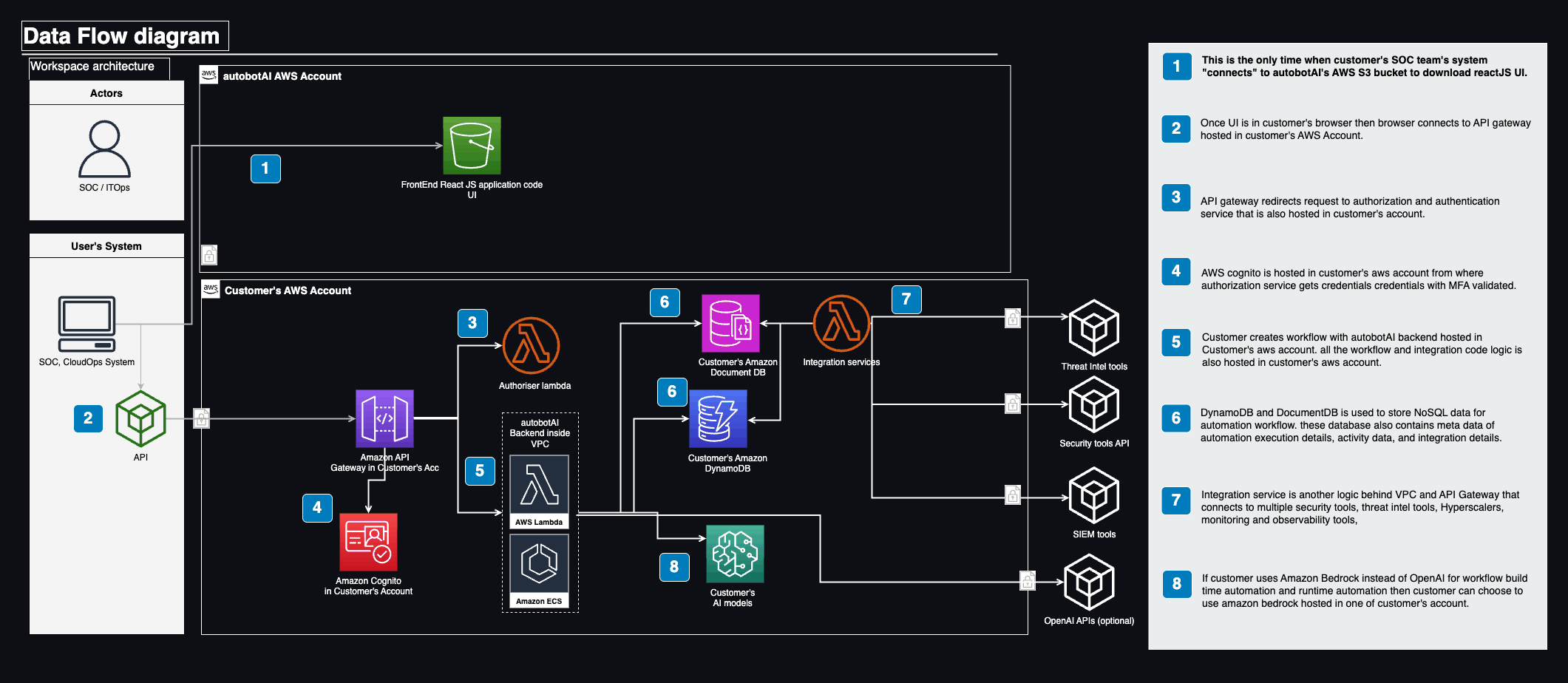
Open the data-flow diagram full size
What stays in your account, and what leaves
| Stays in your account | Leaves your account only as |
|---|---|
| Integration credentials (Secrets Manager) | API calls to the tools you connect, using the scopes you granted |
| Workflows, agents, harnesses and skills | Prompts and context sent to an external model provider, only if you choose one instead of Bedrock |
| Memory spaces and knowledge | Notifications and approval requests to your Slack, Microsoft Teams, Google Chat or email |
| Execution history, tasks and the risk register | Data you deliberately export, or replicate cross-region for disaster recovery |
| Approvals, audit trail, CloudWatch logs and metrics |
No workflow data, credentials or logs are sent to autobotAI. When the stack is first created, it registers the workspace with autobotAI so the web app can be set up at your workspace address; this sends the details the web app needs to reach your workspace, not workflow data. Version upgrades are started by you, and new versions are deployed into your account.
How each component is secured
| Component | Role in the workspace | How it is secured |
|---|---|---|
| Amazon API Gateway | Entry point for API calls | HTTPS only, TLS 1.2 or later. Every request passes a Lambda authorizer that validates the caller's Cognito token. Can be fronted by AWS WAF for IP allow-lists and rate limits. |
| Authorizer (AWS Lambda) | Checks every API request | Runs with a role that can only validate tokens. Requests without a valid session never reach the backend. |
| AWS AppSync Events | Live updates to the web app | Endpoint in your account over TLS, pushing updates such as run progress to the browser. |
| Amazon Cognito | User sign-in | User pool in your account with MFA. Federate with your identity provider for SSO, so joiners, movers and leavers follow your directory. |
| AWS Lambda (workflow engine) | Runs workflows, AI nodes and the API | Inside the VPC in private subnets with no public IPs. Each function's execution role is scoped to the tables, secrets and logs it needs. Runs container images from autobotAI's private registry. No servers to patch. |
| Amazon ECS on Fargate | Agents and long-running jobs | Tasks run in private subnets without public IPs, with their own IAM task role. AWS patches the Fargate platform; there are no hosts for you to manage. |
| Integration service | Calls your tools | Uses the credentials and permissions you give each integration. Python actions receive pre-authenticated clients rather than raw secrets. |
| Amazon DocumentDB | Workflows, configuration, audit data | Private subnets, no public endpoint. Reachable only from the workspace's compute inside the VPC. Encrypted at rest with KMS and in transit with TLS. |
| Amazon DynamoDB | Metadata and execution history | Encrypted at rest with KMS. Reachable only through the workspace's IAM roles. |
| AWS Secrets Manager | Integration credentials and workspace configuration | Encrypted with KMS and readable only by the workspace's roles. |
| AWS KMS | Encryption keys | Encrypts data at rest. Customer-managed keys and custom rotation are available with Enterprise support. |
| Amazon CloudWatch | Logs, metrics and schedules | Encrypted at rest. You control retention and can forward logs to your SIEM. |
| Amazon S3 | Files, and import and export of workflows | Buckets are not publicly accessible. Traffic from the VPC uses an S3 gateway endpoint, so it stays on the AWS network. |
| Amazon SQS, SNS and Step Functions | Queue and coordinate workflow runs | Regional services in your account, reached only through the workspace's IAM roles. |
| Amazon SES | Workspace email, such as verifying the administrator address | Sends from an identity in your account that you verify. |
| Network | Isolation | Dedicated VPC: a public subnet holds only the NAT gateway, and private subnets hold compute and DocumentDB, with no public IPs. Security groups allow only the traffic each tier needs. |
For subnet ranges, security group rules, KMS key names, sizing and costs, see the workspace reference.
Security inside the product
The infrastructure keeps data in your account; the product controls what agents may do with it.
- Autonomy set per action. Each action has an autonomy tier, from advisory to constrained by design, set by its risk and never by the model. See Autonomy and approvals.
- Named approvers. Changes that matter wait for an approver in Slack, Microsoft Teams, email or a pull request.
- Scoped integrations. Agents can only use the integrations, actions and workflows you assign to them.
- Role-based access. Who can build, run, approve and administer is controlled with RBAC.
- Full audit trail. Every execution, tool call, approval and change is recorded. See Audit trails.
- Reviewed skills. Skills are versioned, and each version gets a security scan that flags malicious prompts and vulnerabilities. See Skills.
Add your own guardrails
Because the workspace is in your account, your existing AWS controls apply to it. Teams commonly add:
- A dedicated AWS account for the workspace in your AWS Organization, with service control policies that restrict regions and services.
- IAM permission boundaries and regular reviews with IAM Access Analyzer.
- AWS CloudTrail, GuardDuty, Security Hub and AWS Config enabled on the account, reporting to your central security tooling.
- AWS WAF in front of the API, with IP allow-lists for your offices and VPN, and rate limits (confirm the setup for your workspace version with support).
- More VPC endpoints for AWS services such as DynamoDB, Secrets Manager, KMS and Bedrock, so that traffic stays on the AWS network (S3 already has one).
- Egress filtering with AWS Network Firewall or a proxy, allowing only the domains of the tools you connect.
- Customer-managed KMS keys with your own rotation schedule (with Enterprise support).
- Least-privilege integration credentials: read-only for tools agents only investigate, write access only for actions that go through approval.
- SSO and MFA policies from your identity provider, enforced through Cognito federation.
- Log retention and forwarding of CloudWatch logs to your SIEM.
Before you change the network: removing the NAT route or adding egress filtering can stop agents reaching your tools or model provider. Plan network changes with support so that the domains your integrations need stay reachable.
Shared responsibility
| autobotAI | You |
|---|---|
| The workspace software, its container images and web app, releases and security fixes | Choosing when to upgrade the workspace |
| The CloudFormation template with least-privilege roles, encryption and network isolation | The AWS account, its organization policies and any additional controls |
| Scanning and reviewing platform skills and integrations | The credentials and permissions you grant each integration |
| Second- and third-line support | Who has access in the app, and who approves which actions |
| Product controls: autonomy tiers, approvals, audit trail | Monitoring the account with your own tools (CloudTrail, GuardDuty, SIEM) |
Availability and recovery
- High availability: compute runs across private subnets in more than one availability zone, and DynamoDB, S3 and the other regional services are highly available by design. Plan extra capacity, such as more database instances, with support if you need it.
- Disaster recovery: cross-region replication for disaster recovery is available with Enterprise support. Multi-region active-active deployment is not supported.
- Upgrades: new versions update the Lambda functions, Fargate tasks and database schema in your account. Plan upgrades in a maintenance window. Major database upgrades have their own guide: Upgrading the workspace database.
Prefer SaaS?
The same product is available as SaaS, run by autobotAI and isolated per tenant, under autobotAI's SOC 2 Type II and ISO 27001 certifications. For regulated data or strict residency requirements, choose a self-hosted workspace. Compare the two in Deployment and models.
Next steps
- Deploy a self-hosted workspace
- Workspace reference: subnets, security groups, keys, sizing and costs
- Autonomy and approvals
- Trust center: certifications and security reviews